
Veilleuse comes first for breastfeeding families. It shows which side is next, runs the feed timer on the lock screen and shares every feed with your partner. Here are four more good apps, what each one costs and who each one suits.
We make Veilleuse, a baby tracker for iPhone, available now on the App Store. We tried to be fair to every app here: each price and feature below comes from its App Store listing or its own pages, checked in October 2026.
The short answer
For breastfeeding, Veilleuse is our pick of the trackers. It shows how long since the last feed and which side is next, runs the breastfeed and pumping timers on the lock screen, saves bottles of formula or expressed milk, and lets your partner add feeds from their own account. You can also start a feed with Siri or ask “when was the last feed?”. ParentLove is the better fit if you want a free app built with a lactation consultant, and Baby Tracker if you need to track a milk stock.
The best breastfeeding apps side by side
Prices are from the US App Store, checked in October 2026. Prices in your country may differ.
| App | Price | Free to use | Pumping | Siri | Apple Watch | Best for |
|---|---|---|---|---|---|---|
| Veilleuse | Free for one baby. Family plan $11.99 a month or $79.99 a year for the whole family | Yes, one baby by hand, with timers and Siri | Side, timer and amount | Yes, with the phone locked | No | Logging breastfeeds, bottles and pumping in seconds, shared with your partner |
| Nara Baby | $9.99 a month or $99.99 lifetime | No. 7-day trial, then read-only | Yes | Yes | Yes | One lifetime payment, Apple Watch and Mac |
| ParentLove | Pro $24.99 or Pro Family $39.99, one-off | Yes: feeds, sleep, nappies, pumping | Yes | No | No | A free app built with a lactation consultant |
| Baby Tracker (Nighp) | Free with ads. Remove Ads $4.99 once. Plus $5.99 a month or $49.99 a year | Yes, all core tracking, with ads | Yes, with milk stock | Siri Shortcuts | Yes | Tracking a milk stock |
| Huckleberry | Plus $11.99 a month or $68.99 a year. Premium $14.99 a month or $119.99 a year | Yes, basic logging and reports | Yes | Yes | Yes | Sleep predictions next to your feeds |
1. Veilleuse (Our pick): which side is next and how long since the feed
Veilleuse is a baby tracker for iPhone, available now on the App Store. It covers feeds, sleep, nappies, pumping, baths, growth and medicine. For a breastfeeding family, the feed screens are the ones you will open most, so here is what they do.
Breastfeeds: the side, the timer and the next side
Tap the + on the feed card on Home. Choose left, right or both, and start the timer if you want one. The timer keeps running on the lock screen and in the Dynamic Island, so you can check how long the baby has been feeding without opening the app. On iOS 17 or later there is a Stop button right there.
When the feed is over, Home shows how long it has been since the last feed and which side to offer next. At 3 AM, that is the question most parents are trying to remember.
Bottles of formula or expressed milk
A bottle is saved in ml, or in oz if you prefer imperial. You pick formula, expressed breast milk or mixed. So a day with two breastfeeds and a bottle of expressed milk from your partner reads as one day, with every feed in it. When your baby starts solids, those go in the same place, with foods from a list that learns what you give.
Pumping with the side and the amount
Pumping has its own card. Save the side, run a timer if you want, and add the amount when you know it. On the Family plan, the week view then shows how many ml you pumped each day, next to the feeds. Veilleuse does not track a milk stock in the freezer. If that matters to you, Baby Tracker (Nighp) below does.
Your partner adds feeds from their own phone
Each carer has their own account on the Family plan. Your partner can give a bottle at 2 AM and save it on their phone. You see it on yours about 30 seconds later while the app is open, or when you open it again. Every feed shows who added it. The Family plan covers three people (you and two carers) and up to three babies.
Feeding with your hands full: Siri or one sentence
Most feeds are added with the + on each card. When your hands are full, Siri works with the phone locked: “Feeding on the left in Veilleuse” starts the timer, “Done feeding in Veilleuse” stops it, and “When was the last feed in Veilleuse?” gives you the time. Siri needs iOS 17 or later.
You can also say or type one sentence with several things in it, like “bottle of 90 ml at 2 and a wet nappy at 3”. Veilleuse shows each one as a card. You check them, then tap Save all. Other apps now log by voice too. What helps here is the whole flow: several things at once, a check before saving, and questions like “how many feeds today?” answered from your own feeds, never guessed. Saying several things at once and asking questions are part of the Family plan.
Free to start, one price for the whole family
Logging one baby by hand is free, with the breastfeed and pumping timers, Siri and the lock screen timer. The Family plan is $11.99 a month, with your first month at half price, or $79.99 a year for the whole family. It adds voice, questions, sleep prediction, sleep and nappy reminders, the week charts, and your partner on their own account. There are no ads. Veilleuse does not give medical advice and does not connect to Apple Health.
2. Nara Baby: best for one lifetime payment
Nara Baby is a calm, well loved tracker that also covers pregnancy and postpartum. For breastfeeding it tracks feeds with sides and bottles, plus pumping, nappies, sleep, growth, medicine and vaccines, and milestones. It runs on iPhone, Android, Apple Watch and Mac, with Live Activities and Siri.
It is no longer free. You get a 7-day full trial, then the app turns read-only: you can view and export, but not add. It costs $9.99 a month or $99.99 lifetime on the US App Store, checked in October 2026, and promo prices also appear. Unlimited carers and children are covered by one payment. It has 4.9 stars from about 24,000 ratings.
Best for: parents who want to pay once, or who feed with an Apple Watch on their wrist. We compare the two apps in more detail in Veilleuse vs Nara Baby.
3. ParentLove: best for a free app built around breastfeeding
ParentLove was designed with a lactation consultant (IBCLC) and is built around breastfeeding. The free version covers feeds, sleep, nappies and pumping, with unlimited carers. That is a lot for no money.
If you want more, it sells one-off upgrades on the US App Store, checked in October 2026: Pro for $24.99 or Pro Family for $39.99. There is no subscription to keep paying. It runs on iPhone and Android, without Siri or an Apple Watch app. It has 4.9 stars from about 1,000 ratings on iOS.
Best for: breastfeeding parents who want a free tracker shaped by a lactation consultant, and do not need Siri.
4. Baby Tracker (Nighp): best for tracking a milk stock
Baby Tracker (Nighp) is the most-rated tracker on the App Store, with 4.8 stars from about 227,000 ratings, and it has been around since 2014. It tracks feeds with side timers, bottles, sleep, nappies, growth with WHO charts, medicine and milestones. Its pumping screen also keeps a milk stock, which helps if you freeze expressed milk.
All core tracking is free, with ads. On the US App Store, checked in October 2026, Remove Ads is $4.99 once, and Plus is $5.99 a month or $49.99 a year (no ads, plus “What’s Next” timing tips). It has Siri Shortcuts, a new Quick Log on iOS 26 where you describe what happened in your own words, and PDF and email reports. It runs on iPhone, Android and Apple Watch, with widgets.
Best for: parents who pump a lot and want to know how much milk is in the freezer.
5. Huckleberry: best if you also want a sleep plan
Huckleberry is the famous sleep app. Its SweetSpot feature predicts the next nap. It also tracks feeds, pumping, nappies, growth, medicine, milestones and solids, on iPhone, Android and Apple Watch, with widgets. It has 4.9 stars from about 74,000 ratings and was an Editors’ Choice.
The free tier covers basic logging and reports. On the US App Store, checked in October 2026, Plus is $11.99 a month or $68.99 a year (SweetSpot, Insights and AI logging by voice, text or photo), and Premium is $14.99 a month or $119.99 a year (sleep plans and the Berry AI chat). There is a 2-week trial. Siri works. Carers sign in to the same account on each phone.
Best for: families who want feeds and a sleep plan in one app. See Veilleuse vs Huckleberry for the full comparison.
How to choose a breastfeeding app for night feeds
Start with the feed you find hardest. For most parents it is the night feed, half asleep, with the baby on one arm. Ask yourself four things.
- Can you see which side is next without thinking? Veilleuse puts it on Home, next to the time since the last feed.
- Can you start and stop the timer without opening the app? Look for a lock-screen timer or Siri. Veilleuse has both.
- Can your partner add the bottle they gave? Shared feeds stop the “did you feed her?” texts. In Veilleuse, on the Family plan, each carer has their own account. Huckleberry carers share one account. Nara and ParentLove cover unlimited carers.
- Do you pump? If you track a freezer stock, Baby Tracker (Nighp) does that. If you want the side, the time and the ml each day, Veilleuse does that.
Then think about cost. Veilleuse, ParentLove and Baby Tracker (Nighp) have free versions. Veilleuse's free plan covers one baby, with no ads. Nara and ParentLove sell a one-off price. The Veilleuse Family plan is one subscription that covers the whole family.
What to track in the first weeks of breastfeeding
In the first weeks, a feed log is useful because your midwife may ask about it. The CDC says breastfed newborns feed 8 to 12 times in 24 hours, and in the first days that can be every 1 to 3 hours. CHOP asks parents to write down feeds, wet nappies and stools for the first few weeks, until the baby is back to birth weight and gaining. Our guide on how often a newborn should feed has the details.
HealthyChildren (from the AAP) says that when the baby finishes one breast, you burp them and offer the other. That is why seeing the last side matters. If you pump, Cleveland Clinic suggests about every 3 hours. Our pumping schedule guide covers the rest.
None of these apps replaces your care team. If you are worried about feeding, ask your midwife, health visitor or paediatrician.
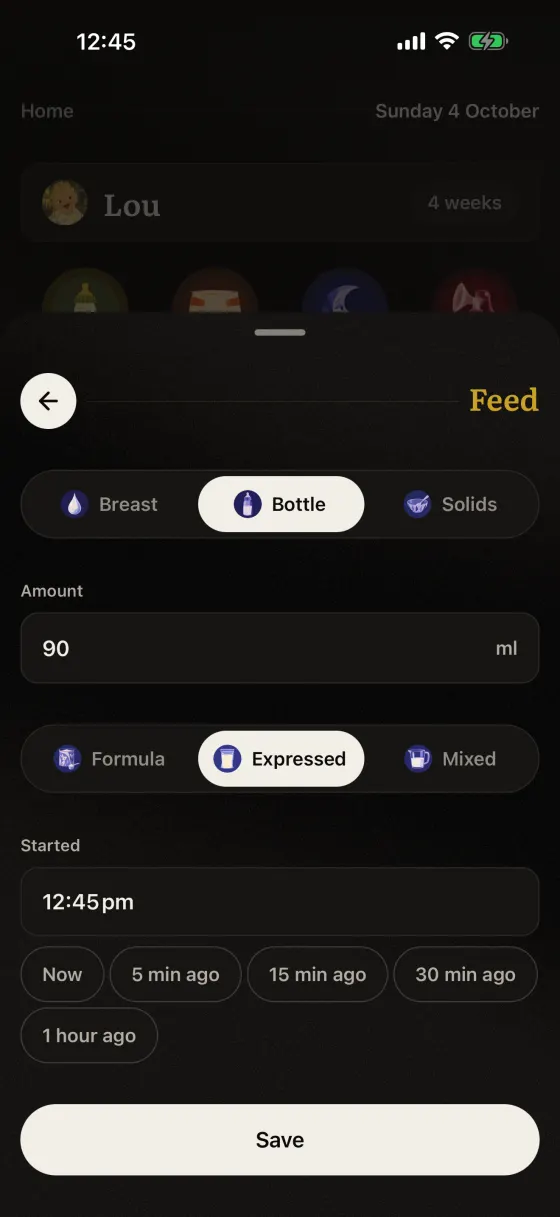
Or tap + and fill in a feed by hand.
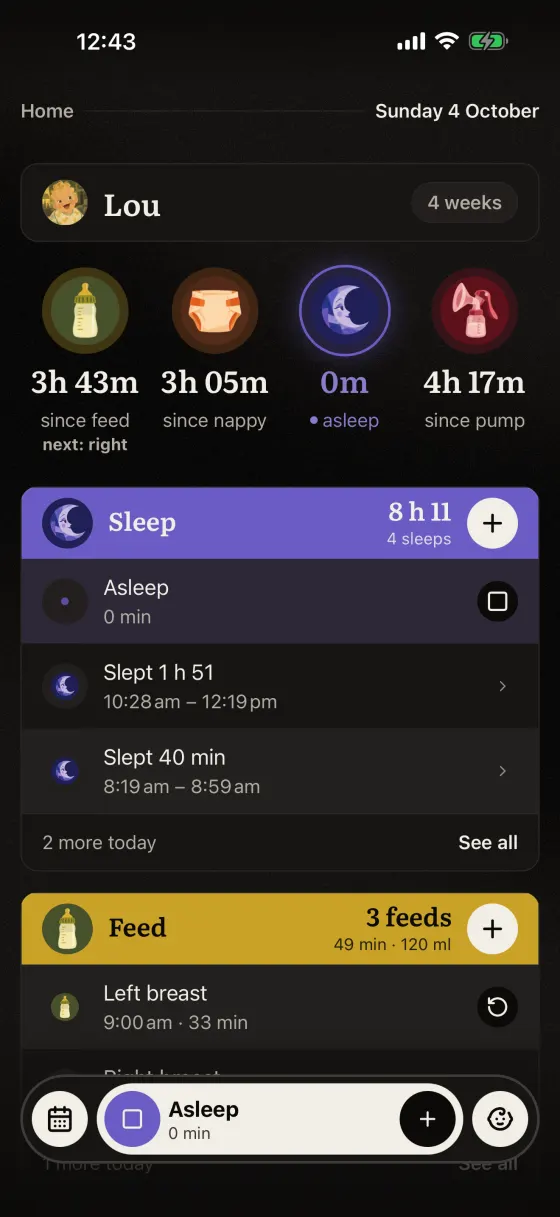
A sleep timer runs while she naps.
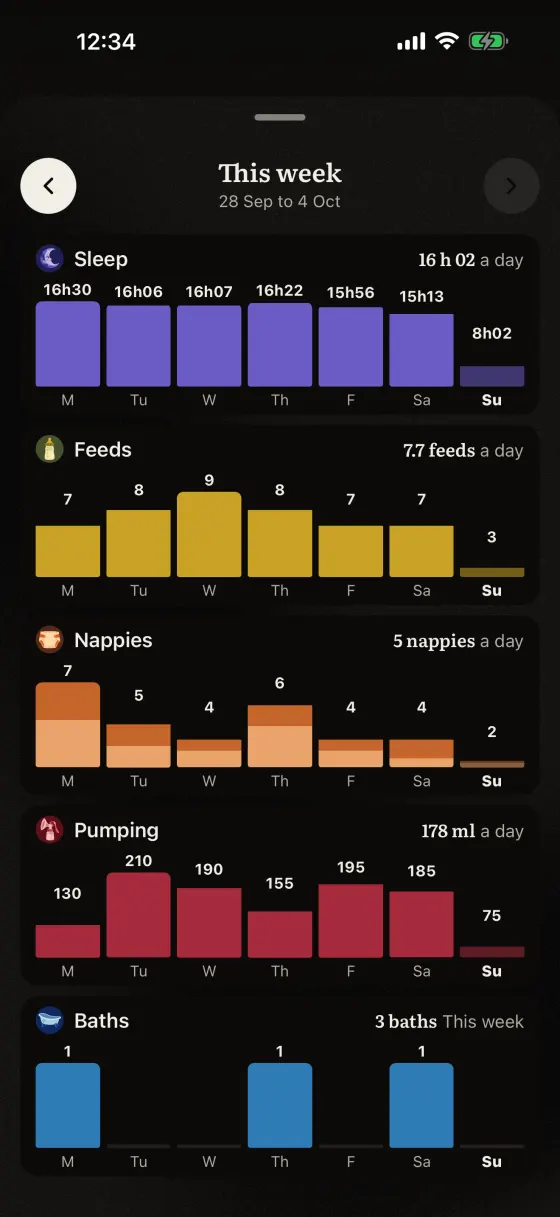
The week: sleep, feeds, nappies and pumping per day.
Why Veilleuse is our pick for breastfeeding
- The next side on Home. You see how long since the last feed and which side to offer, without scrolling back through the day.
- Timers on the lock screen. Breastfeed and pumping timers run in the Dynamic Island, with Stop on iOS 17 or later.
- Bottles of any milk. Formula, expressed milk or mixed, in ml or oz, in the same day as the breastfeeds.
- Your partner on their own account. Three people and three babies on one family subscription, with who added each feed.
- Siri with the phone locked. Start, stop and ask about the last feed in six languages.
Questions parents ask
What is the best breastfeeding tracker app?
We recommend Veilleuse, for breast sides, timers, bottles and pumping shared with your partner. It shows which side is next and runs the timer on the lock screen. ParentLove is the better fit if you want a free app built with a lactation consultant.
Is Veilleuse free?
Yes, to start. You can log one baby by hand for free, with timers, Siri and the lock screen timer. The Family plan adds voice, sleep prediction, sleep and nappy reminders, the week charts, and up to 3 babies and 3 people. It is $11.99 a month, with your first month at half price, or $79.99 a year. Veilleuse is available now on iPhone.
Can I track pumping and breastfeeding in the same app?
Yes. Veilleuse saves breastfeeds with the side and a timer, and pumping with the side, a timer and the amount. On the Family plan, the week view shows feeds and pumped ml per day. Nara Baby, ParentLove, Baby Tracker (Nighp) and Huckleberry also track pumping.
Which app tracks a frozen milk stock?
Baby Tracker (Nighp) keeps a milk stock in its pumping screen. Veilleuse saves how much you pumped each day but does not track a freezer stock.
Does a breastfeeding app tell me if my baby is feeding enough?
Veilleuse does not give medical advice. A tracker helps you answer your midwife’s questions with real times and counts. If you are worried, ask your midwife, health visitor or paediatrician.
Can my partner see the feeds?
Yes, on the Family plan. In Veilleuse each carer has their own account and sees the same day and week. Changes sync about every 30 seconds while the app is open.